Working with Stages
Each Kargo Stage is represented by a Kubernetes resource of type Stage.
The Stage Resource Type
Like most Kubernetes resources, a Stage is composed of a user-defined spec field
and a system-populated status field.
A Stage resource's spec field is itself composed of three main areas of concern:
-
Requested Freight
-
Promotion template
-
Verification
The following sections will explore each of these spec sections as well as status in greater detail.
Requested Freight
The spec.requestedFreight field is used to describe one or more "types" of
Freight, as specified by an origin, that the Stage's promotion process, as
specified by spec.promotionTemplate, will operate on, and the acceptable
sources from which to obtain that Freight. Those sources may include the
origin itself (e.g. a Warehouse) and/or any number of "upstream" Stage
resources.
Warehouses are the only type of origin at present, but it is anticipated that
future versions of Kargo will introduce additional origin types. This is why
"types" of Freight are described by an origin field having kind and name
subfields instead of being described only by the name of a Warehouse.
For each Stage, the Kargo controller will periodically check for Freight
resources that are newly available for promotion to that Stage.
When a Stage accepts Freight directly from its origin, all new Freight
created by that origin (e.g. a Warehouse ) are immediately available for
promotion to that Stage.
When a Stage accepts Freight from one or more "upstream" Stage resources,
Freight is considered available for promotion to that Stage only after being
verified in at least one of the upstream Stages. Alternatively, users with
adequate permissions may manually approve Freight for promotion to any given
Stage without requiring upstream verification.
Explicit approvals are a useful method for applying the occasional "hotfix"
without waiting for a Freight resource to traverse the entirety of a pipeline.
In the following example, the test Stage requests Freight that has
originated from the my-warehouse Warehouse and indicates that it will accept
new Freight directly from that origin:
apiVersion: kargo.akuity.io/v1alpha1
kind: Stage
metadata:
  name: test
  namespace: kargo-demo
spec:
  requestedFreight:
  - origin:
      kind: Warehouse
      name: my-warehouse
    sources:
      direct: true
  # ...
# ...
In this example, the uat Stage requests Freight that has originated from
the my-warehouse Warehouse, but indicates that it will accept such Freight
only after it has been verified in the test Stage:
apiVersion: kargo.akuity.io/v1alpha1
kind: Stage
metadata:
  name: uat
  namespace: kargo-demo
spec:
  requestedFreight:
  - origin:
      kind: Warehouse
      name: my-warehouse
    sources:
      stages:
      - test
  # ...
Stages may also request Freight from multiple sources. The following example
illustrates a Stage that requests Freight from both a microservice-a and
microservice-b Warehouse:
apiVersion: kargo.akuity.io/v1alpha1
kind: Stage
metadata:
  name: test
  namespace: kargo-demo
spec:
  requestedFreight:
  - origin:
      kind: Warehouse
      name: microservice-a
    sources:
      direct: true
  - origin:
      kind: Warehouse
      name: microservice-b
    sources:
      direct: true
  # ...
By requesting Freight from multiple sources, a Stage can effectively
participate in multiple pipelines that may each deliver different collections
of artifacts independently of the others.
This is advanced configuration. If you're very new to Kargo
and requesting Freight from multiple origins, you probably
didn't mean to.
Promotion Templates
The spec.promotionTemplate field is used to describe how to transition
Freight into the Stage. The spec.promotionTemplate.steps field describes
the discrete steps of a promotion process in detail.
In the following, very common example, the promotionTemplate describes steps
to:
-
Clone a Git repository containing Kubernetes manifests and Kustomize configuration, checking out two different branches to two different directories.
-
Clears the contents of one working tree, with intentions to fully replace its contents.
-
Runs the equivalent of
kustomize edit set imageto update akustomization.yamlfile with a reference to an updatedpublic.ecr.aws/nginx/nginxcontainer image. -
Renders the updated manifests using the equivalent of
kustomize build. -
Commits the updated manifests and pushes them to the
stage/testof the remote repository. -
Forces Argo CD to sync the
kargo-demo-testapplication to the latest commit of thestage/testbranch.
promotionTemplate:
  spec:
    vars:
    - name: gitopsRepo
      value: https://github.com/example/repo.git
    - name: imageRepo
      value: public.ecr.aws/nginx/nginx
    - name: srcPath
      value: ./src
    - name: outPath
      value: ./out
    - name: targetBranch
      value: stage/${{ ctx.stage }}
    steps:
    - uses: git-clone
      config:
        repoURL: ${{ vars.gitopsRepo }}
        checkout:
        - branch: main
          path: ${{ vars.srcPath }}
        - branch: stage/${{ ctx.stage }}
          create: true
          path: ${{ vars.outPath }}
    - uses: git-clear
      config:
        path: ${{ vars.outPath }}
    - uses: kustomize-set-image
      as: update-image
      config:
        path: ${{ vars.srcPath }}/base
        images:
        - image: ${{ vars.imageRepo }}
    - uses: kustomize-build
      config:
        path: ${{ vars.srcPath }}/stages/${{ ctx.stage }}
        outPath: ${{ vars.outPath }}/manifests.yaml
    - uses: git-commit
      as: commit
      config:
        path: ${{ vars.outPath }}
        messageFromSteps:
        - update-image
    - uses: git-push
      config:
        path: ${{ vars.outPath }}
        branch: ${{ vars.targetBranch }}
    - uses: argocd-update
      config:
        apps:
        - name: kargo-demo-${{ ctx.stage }}
          sources:
          - repoURL: ${{ vars.gitopsRepo }}
            desiredRevision: ${{ outputs.commit.commit }}
For complete documentation of all Kargo's built-in promotion steps, refer to the Promotion Steps Reference.
Verifications
The spec.verification field is used to describe optional verification
processes that should be executed after a Promotion has successfully deployed
Freight to a Stage, and if applicable, after the Stage has reached a
healthy state.
Verification processes are defined through references to one or more
Argo Rollouts AnalysisTemplate resources
that reside in the same Project/Namespace as the Stage resource.
Argo Rollouts AnalysisTemplate resources (and the AnalysisRun resources that
are spawned from them) were intentionally built to be re-usable in contexts
other than Argo Rollouts. Re-using this resource type to define verification
processes means those processes benefit from this rich and battle-tested feature
of Argo Rollouts.
The following example depicts a Stage resource that references an
AnalysisTemplate named kargo-demo to validate the test Stage after any
successful Promotion:
apiVersion: kargo.akuity.io/v1alpha1
kind: Stage
metadata:
  name: test
  namespace: kargo-demo
spec:
  # ...
  verification:
    analysisTemplates:
    - name: kargo-demo
It is also possible to specify additional labels, annotations, and arguments
that should be applied to AnalysisRun resources spawned from the referenced
AnalysisTemplate:
apiVersion: kargo.akuity.io/v1alpha1
kind: Stage
metadata:
  name: test
  namespace: kargo-demo
spec:
  # ...
  verification:
    analysisTemplates:
    - name: kargo-demo
    analysisRunMetadata:
      labels:
        foo: bar
      annotations:
        bat: baz
    args:
    - name: foo
      value: bar
An AnalysisTemplate could be as simple as the following, which merely executes
a Kubernetes Job that is defined inline:
apiVersion: argoproj.io/v1alpha1
kind: AnalysisTemplate
metadata:
  name: kargo-demo
  namespace: kargo-demo
spec:
  metrics:
  - name: test
    provider:
      job:
        metadata:
        spec:
          backoffLimit: 1
          template:
            spec:
              containers:
              - name: test
                image: alpine:latest
                command:
                - sleep
                - "10"
              restartPolicy: Never
Please consult the
relevant sections
of the Argo Rollouts documentation for comprehensive coverage of the full range
of AnalysisTemplate capabilities.
Status
The status field of a Stage resource records:
-
Conditions containing the last observations of the
Stage's current state. -
The current phase of the
Stage's lifecycle (distilled from the conditions). -
Details about the last
Promotionand any in-progressPromotion. -
History of
Freightthat has been deployed to theStage(from most to least recent) along with the results of any associated verification processes. -
The health status of related Argo CD
Applicationresources.
For example:
status:
  freightHistory:
  - id: 101bca5b0e18ca7913978a1da956308d2544f741
    items:
      Warehouse/my-warehouse:
        commits:
        - healthCheckCommit: 111eaf55aa41f21bb9bb707ba1baa748b83ec51e
          id: 961cfaedbc53aacdb65110028839a2c1c281290d
          repoURL: https://github.com/example/kargo-demo.git
        images:
        - digest: sha256:b2487a28589657b318e0d63110056e11564e73b9fd3ec4c4afba5542f9d07d46
          repoURL: public.ecr.aws/nginx/nginx
          tag: 1.27.0
        name: 666209fd9755a1e48bec6b27f5f447747410dd9e
        origin:
          kind: Warehouse
          name: my-warehouse
    verificationHistory:
    - analysisRun:
        name: test.01j2w7aknhf3j7jteyqs72hnbg.101bca5
        namespace: kargo-demo
        phase: Successful
      finishTime: "2024-07-15T22:13:57Z"
      id: 5535a484-bbd0-4f12-8cf4-be2c8e0041c9
      phase: Successful
      startTime: "2024-07-15T22:13:34Z"
  health:
    argoCDApps:
    - healthStatus:
        status: Healthy
      name: kargo-demo-test
      namespace: argocd
      syncStatus:
        revision: 111eaf55aa41f21bb9bb707ba1baa748b83ec51e
        status: Synced
    status: Healthy
  lastPromotion:
    finishedAt: "2024-07-15T22:13:25Z"
    freight:
      commits:
      - healthCheckCommit: 111eaf55aa41f21bb9bb707ba1baa748b83ec51e
        id: 961cfaedbc53aacdb65110028839a2c1c281290d
        repoURL: https://github.com/example/kargo-demo.git
      name: 666209fd9755a1e48bec6b27f5f447747410dd9e
      origin:
        kind: Warehouse
        name: kargo-demo
    name: test.01j2w7a15cxjjgejresfyw6ysp.666209f
    status:
      finishedAt: "2024-07-15T22:13:25Z"
      freight:
        commits:
        - healthCheckCommit: 111eaf55aa41f21bb9bb707ba1baa748b83ec51e
          id: 961cfaedbc53aacdb65110028839a2c1c281290d
          repoURL: https://github.com/example/kargo-demo.git
        name: 666209fd9755a1e48bec6b27f5f447747410dd9e
        origin:
          kind: Warehouse
          name: kargo-demo
      freightCollection:
        id: 101bca5b0e18ca7913978a1da956308d2544f741
        items:
          Warehouse/kargo-demo:
            commits:
            - healthCheckCommit: 111eaf55aa41f21bb9bb707ba1baa748b83ec51e
              id: 961cfaedbc53aacdb65110028839a2c1c281290d
              repoURL: https://github.com/example/kargo-demo.git
            name: 666209fd9755a1e48bec6b27f5f447747410dd9e
            origin:
              kind: Warehouse
              name: kargo-demo
        verificationHistory:
        - analysisRun:
            name: test.01j2w7aknhf3j7jteyqs72hnbg.101bca5
            namespace: kargo-demo
            phase: ""
          id: 5535a484-bbd0-4f12-8cf4-be2c8e0041c9
          phase: Pending
          startTime: "2024-07-15T22:13:34Z"
      phase: Succeeded
  observedGeneration: 1
  phase: Steady
Interacting with Stages
Kargo provides tools to manage Stages using either its UI or CLI. This section explains how to handle Stages effectively through both interfaces.
Users with credentials for and sufficient permissions within the Kargo control plane's Kubernetes cluster can also manage Stage resources using kubectl.
Creating a Stage
- Using the UI
- Using the CLI
-
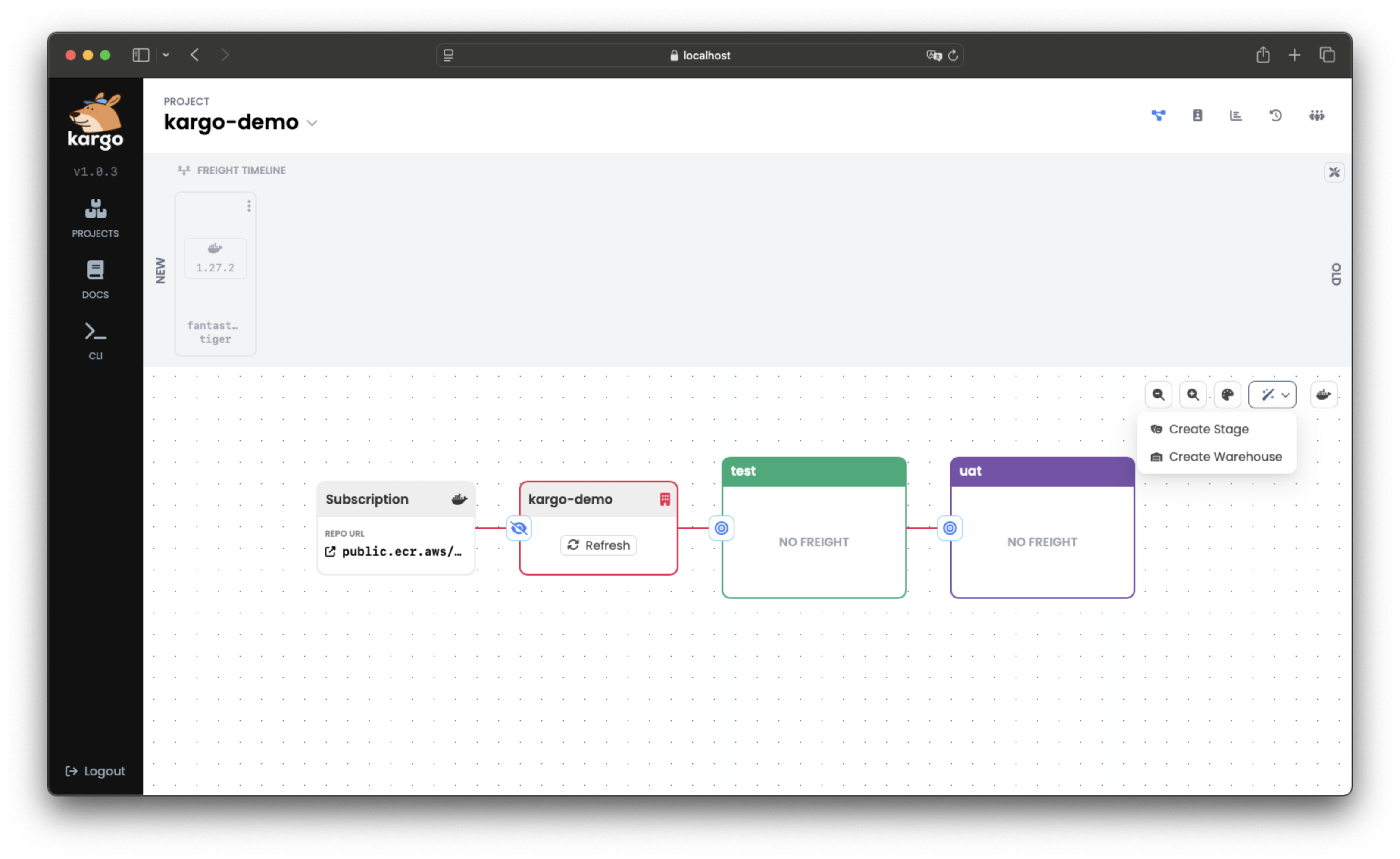
Navigate to your Project in the Kargo UI and locate the action menu in the upper right corner of the pipeline:
-
Click the magic wand icon to open the dropdown, then select Create Stage.
A form will appear to input details for a new
Stage: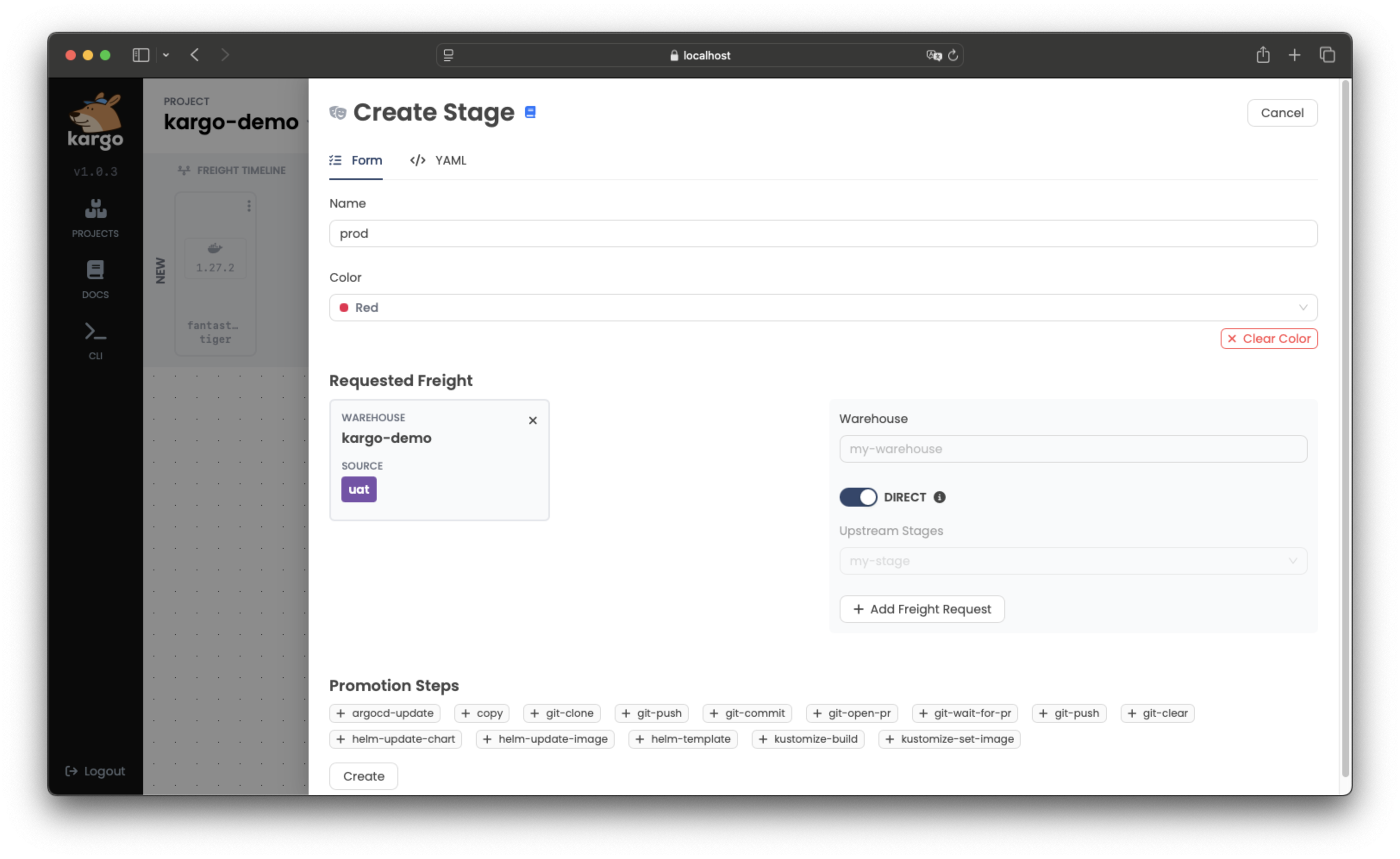
-
Complete the form with the necessary details and submit it.
The new
Stagewill be added to the pipeline, connected to otherStages based on your configuration: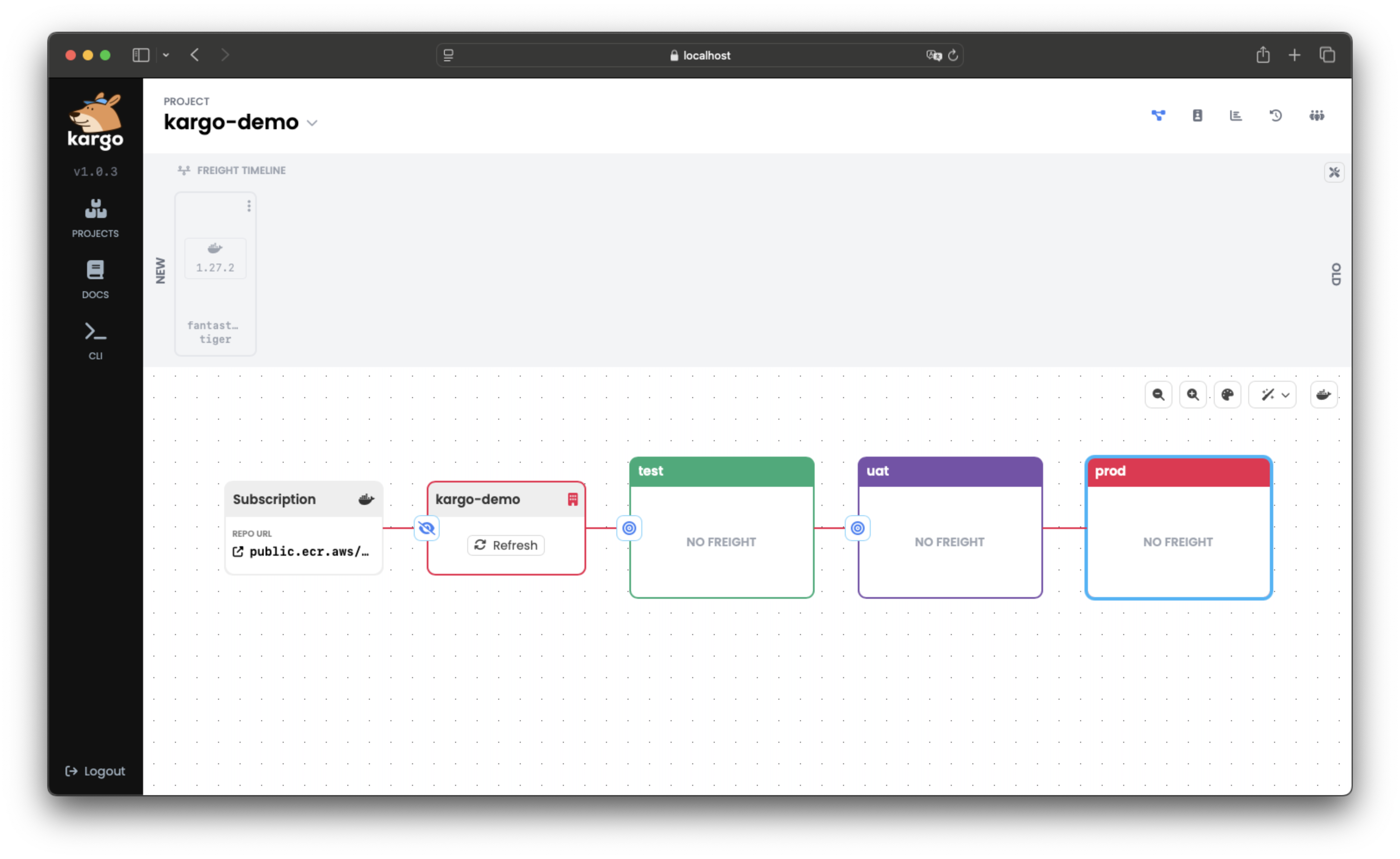
-
Define the
Stagein a YAML file, for example:apiVersion: kargo.akuity.io/v1alpha1
kind: Stage
metadata:
name: <stage>
namespace: <project>
spec:
### Add your Stage specifications here -
Save the file and run:
kargo create -f <filename> -
Verify the creation by listing
Stages:kargo get stage <stage> --project <project>
Promoting Freight to a Stage
For comprehensive guidance on promoting Freight to a Stage, refer to Working with Promotions.
Deleting a Stage
- Using the UI
- Using the CLI
-
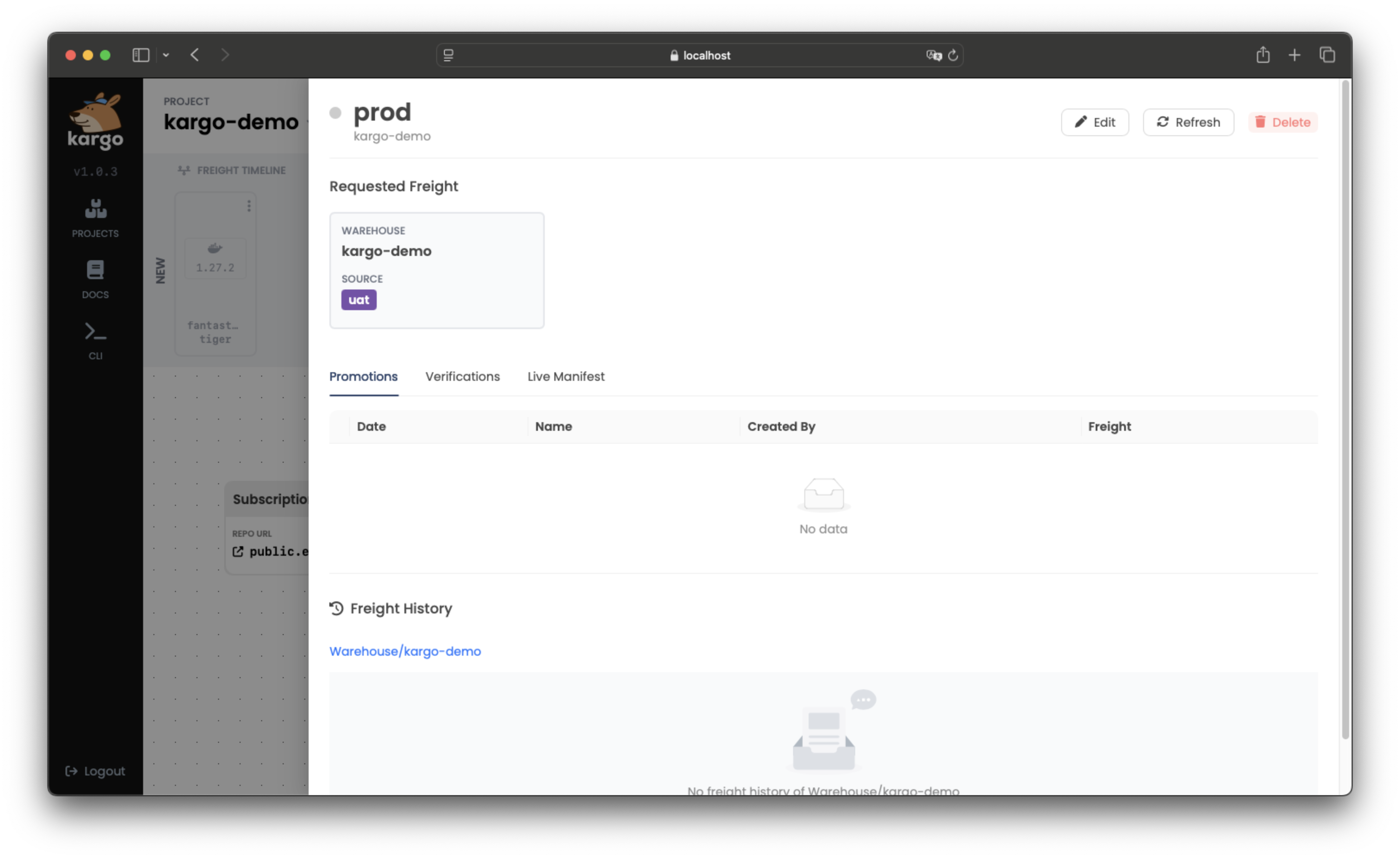
Select the
Stageyou want to remove. -
Click Delete in the upper right corner of the pop-up window:
To delete a Stage using the CLI, run:
kargo delete stage <stage> --project <project>
Refreshing a Stage
Refreshing a Stage triggers its reconciliation process, which
includes checking for any newly-completed Promotions, queueing
up the next, pending Promotion, when applicable, and executing
any applicable health check processes.
- Using the UI
- Using the CLI
-
Select the
Stageyou want to refresh. -
Click Refresh in the top-right corner of the pop-up window:
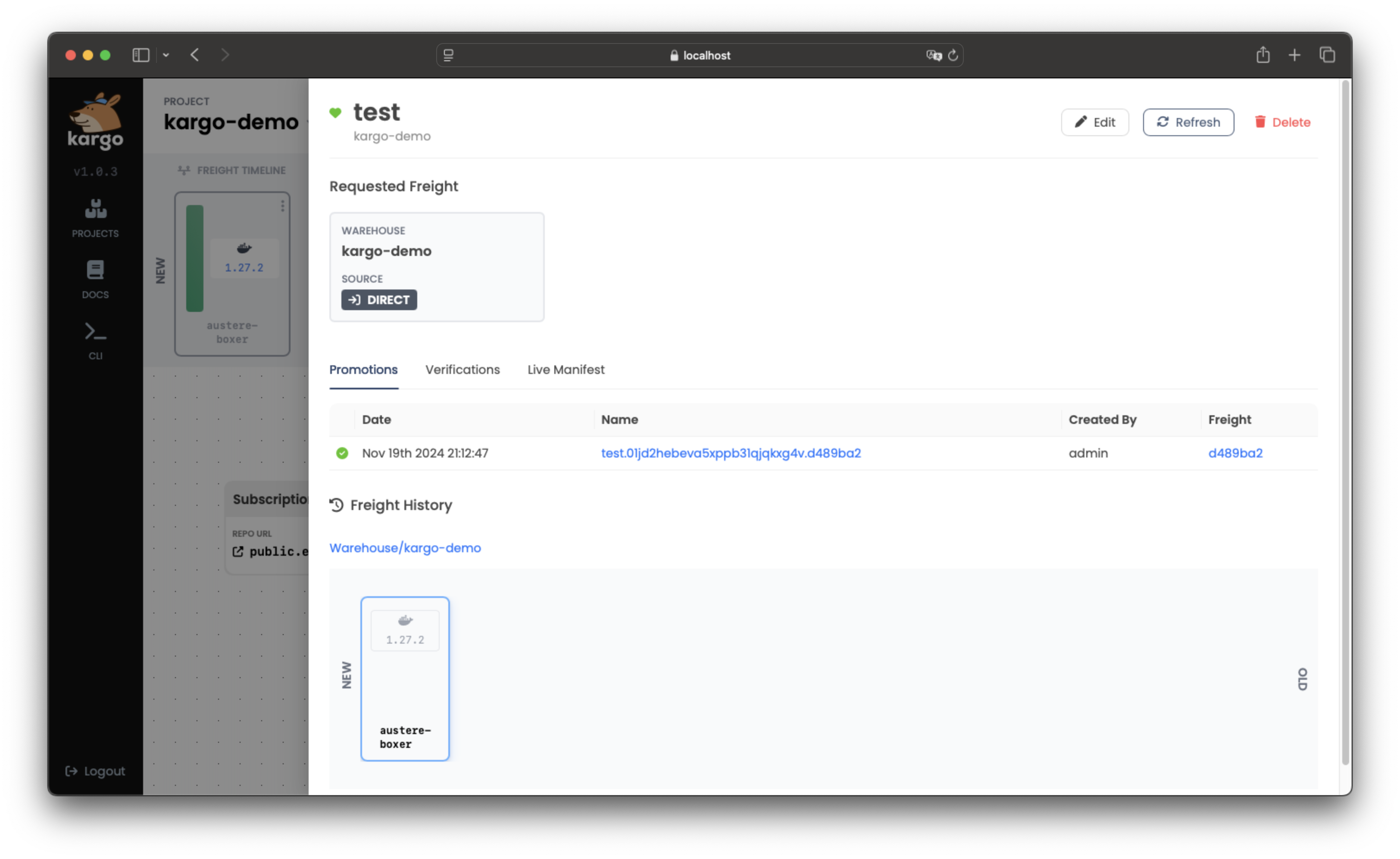
To refresh a Stage, run:
kargo refresh stage <stage> --project <project>
Reverifying a Stage's Current Freight
Verification processes, which run automatically following each successful Promotion,
can also be re-run on-demand. This is useful for re-attempting a failed verification
process or just to validate that applications within the Stage are performing
as desired.
- Using the UI
- Using the CLI
-
Select the
Stageyou want to reverify and click Reverify at the top of the menu: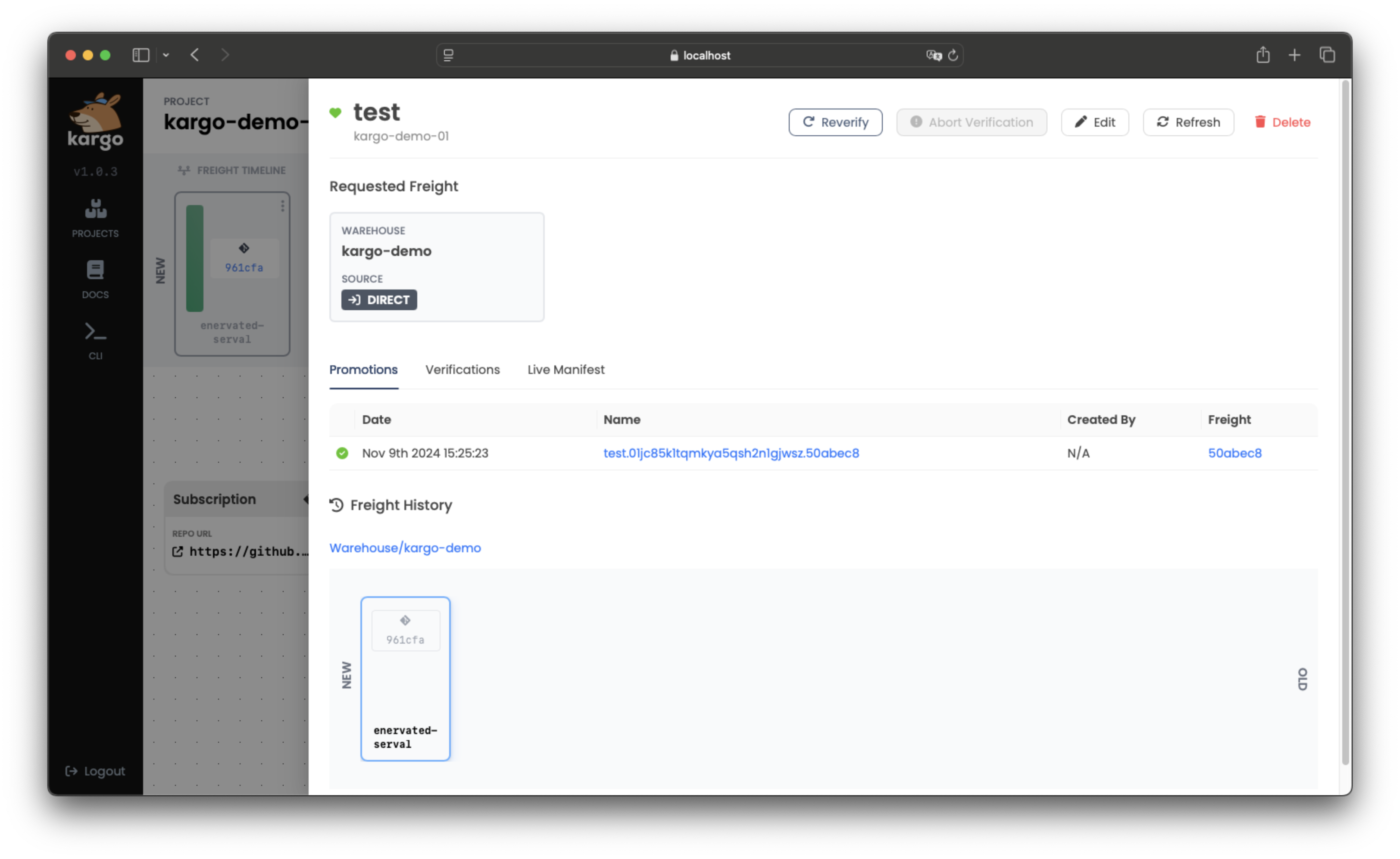 note
noteIf you wish to stop the in-progress verification, you can click Abort Verification.
-
To check the
Stages where theFreighthas been successfully verified, return to the Freight Timeline and select theFreight. VerifiedStagenames will appear under VERIFIED IN: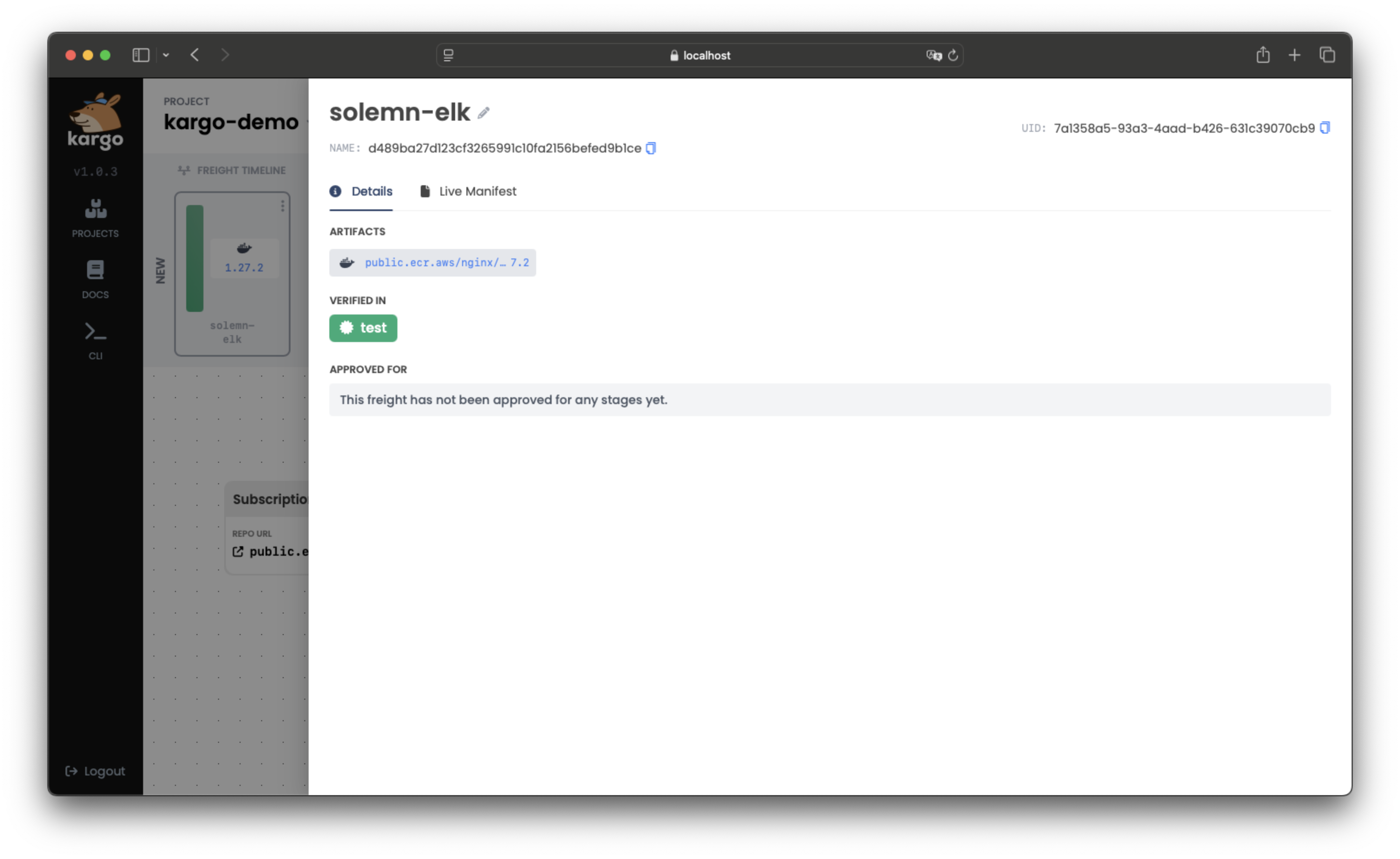
-
To rerun verification using the CLI run:
kargo verify stage <stage> --project <project>If you want to stop this ongoing verification process, use:
kargo verify stage <stage> --project <project> --abort -
To check the
Stages where theFreighthas been successfully verified, run:kargo get freight \
--project <project> \
--output jsonpath-as-json={.status}